
Image Editor AI
Upload a photo, describe the edit, and create clean background, product, restoration, or cleanup edits online.

Create polished visuals with Image Editor AI
Image Editor AI helps with background changes, object cleanup, product shots, restoration, and fast visual experiments from uploaded images.
Seamless Background Replacement with Image Editor AI
Instantly swap distracting backdrops for professional studio settings or creative scenes. Image Editor AI uses advanced edge detection to cleanly isolate subjects, and the workflow is ideal for ecommerce product shots and social media portraits without tedious manual masking.

Clean Product Photo Updates with Image Editor AI
Turn ordinary product shots into cleaner visuals for stores and campaigns. Image Editor AI can improve background, lighting, and presentation while keeping the product shape, material, color, and important details accurate.

Clutter-Free Photos with Image Editor AI Online
Erase small distractions, stray props, dust marks, or background clutter from everyday images. Image Editor AI uses intelligent inpainting to reconstruct the missing background, so the editor leaves you with clean, distraction-free images in seconds.
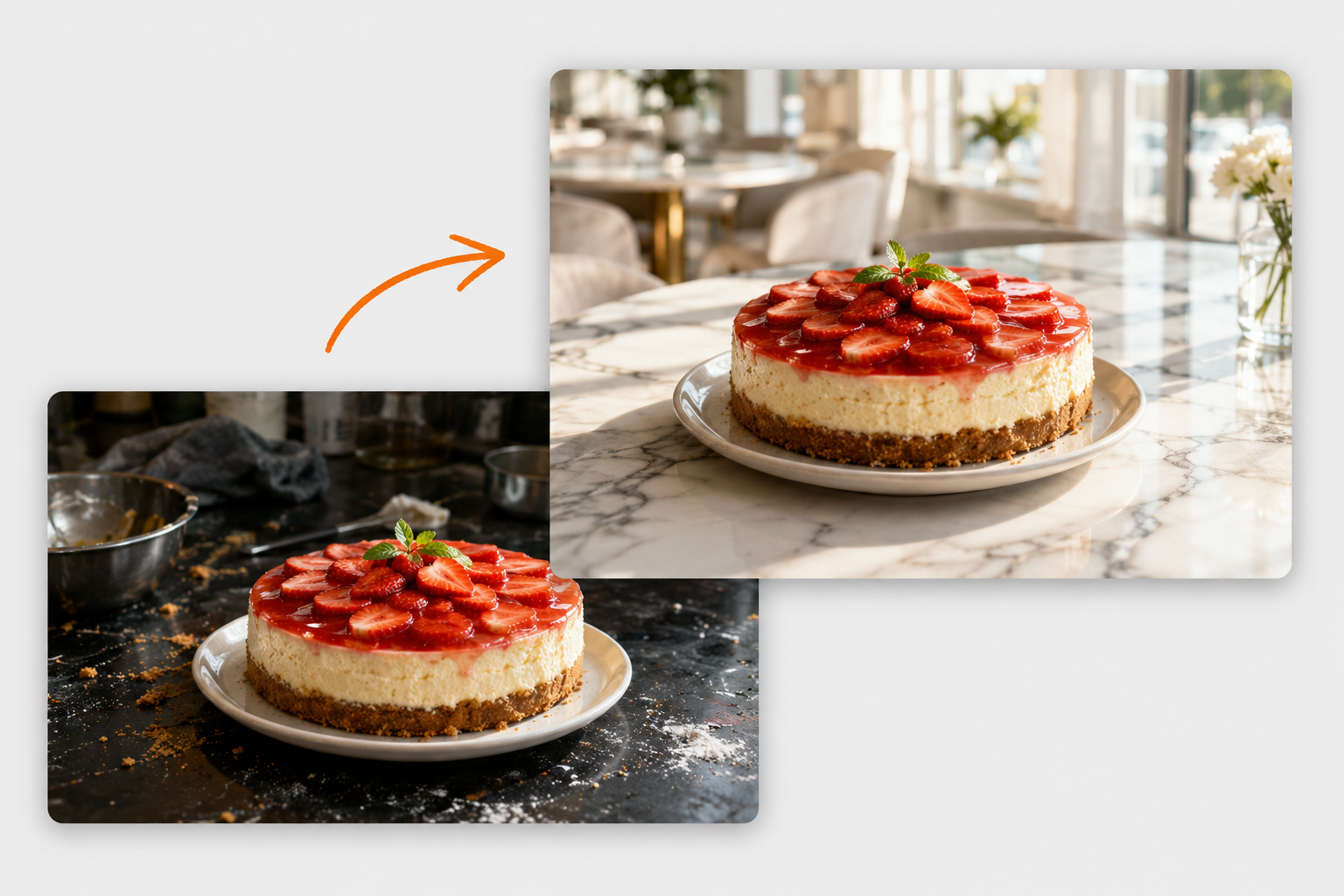
Prompt-Guided Scene Updates with Image Editor AI
Adjust backgrounds, surfaces, lighting, and visual context from a short prompt. Image Editor AI is useful for clean product scenes, simple campaign variations, and practical visual drafts without rebuilding the whole image by hand.
Vintage Photo Restoration with Image Editor AI
Breathe new life into precious family memories by repairing scratches, tears, and fading in vintage prints. Image Editor AI can repair physical wear and realistically colorize monochrome shots while keeping original analog textures intact.

Start with a focused AI editing tool
Choose a dedicated workflow, upload a photo, and use a ready-made prompt to move faster.
Image Utilities
Simple tools for image files
Handle image file-size requirements locally, without uploading a file or signing in.
How Image Editor AI works for prompt-based edits
First upload, then describe, then download. Image Editor AI keeps the flow direct for background edits, cleanup, product photos, and restoration.
Upload your source image
Use one image for quick AI image editor changes or multiple images for fusion.
Choose model and prompt
Pick the model, aspect ratio, and prompt style that help the AI image editor match the output quality and speed you need.
Save every result
Preview and download guest results from Recent Tasks, or sign in to keep completed edits in My Creations.
Built for everyday visual work
Use Image Editor AI for practical visual work, from quick cleanup and product images to marketing assets and authorized reference fusion.
Photo Cleanup
Use the AI photo editor to improve lighting, remove distractions, clean backgrounds, and create a clearer version of an image you own or have permission to edit.
Product Shots
Use the AI image editor to place products in clean scenes, swap backgrounds, and create variations for testing.
Marketing Assets
Use the AI image editor to edit ad concepts, social images, hero visuals, and thumbnails in a faster loop.
Creative Remix
Use the AI image editor to combine authorized references, restore old photos, clean layouts, and iterate on practical visual ideas.
Frequently Asked Questions
Straight answers about uploads, credits, and everyday image editing.
Is Image Editor AI free to use?
You can try a basic edit with guest credits on the homepage. Sign in for daily free credits and access to supported models and quality levels.
Do I need design skills?
No. Image Editor AI is prompt based: upload an image, describe the change, and let the editor handle the heavy image work.
Will it support commercial workflows?
Yes. Image Editor AI can support product photos, marketing assets, background changes, and other practical image editing tasks. Review each result before publishing it or delivering it to a client.
Which file formats can I upload?
The AI image editor accepts JPEG, PNG, and WebP images. Guest uploads are limited to 8MB; signed-in uploads can be up to 24MB each.
How do credits work?
Credits are used for AI image editor tasks. One-time credit packs can be added to your account balance and spent across supported AI photo editor workflows.
Master your workflow with Image Editor AI
ImageEditorAI.co is built for practical image edits: upload a source photo, describe the change, compare the result, and keep your finished creations in one place.
Your focused AI image editor
Traditional tools often make simple creative changes feel heavy. A browser-based AI image editor keeps the workflow direct: upload, prompt, generate, compare, and keep moving. This AI image editor is designed for fast edits instead of complex layer management.
Next-gen editing loop
The AI image editor makes common edits easy, from background changes and cleanup to restoration and creative remixing. Your results stay easy to preview, download, and reuse.
Why creators use an AI image editor
ImageEditorAI.co keeps everyday photo editing simple while still supporting polished results for personal, creative, and business visuals.
Works Online
Edit from the browser without installing heavy desktop software or learning a complicated workspace.
Simple Credits
Start with guest credits, sign in for the full daily allowance, then add one-time credit packs when you need more runs.
Saved Results
Guest results stay in Recent Tasks for 24 hours. Sign in to keep new completed edits in My Creations.
Prompt First
Describe the edit you want in natural language and let Image Editor AI handle the heavy work.
Image Editor AI Help
Quick answers about using ImageEditorAI.co for online photo editing.
Start editing with the AI image editor today.
Upload an image, describe the change, and create a polished result with Image Editor AI.
Launch Editor